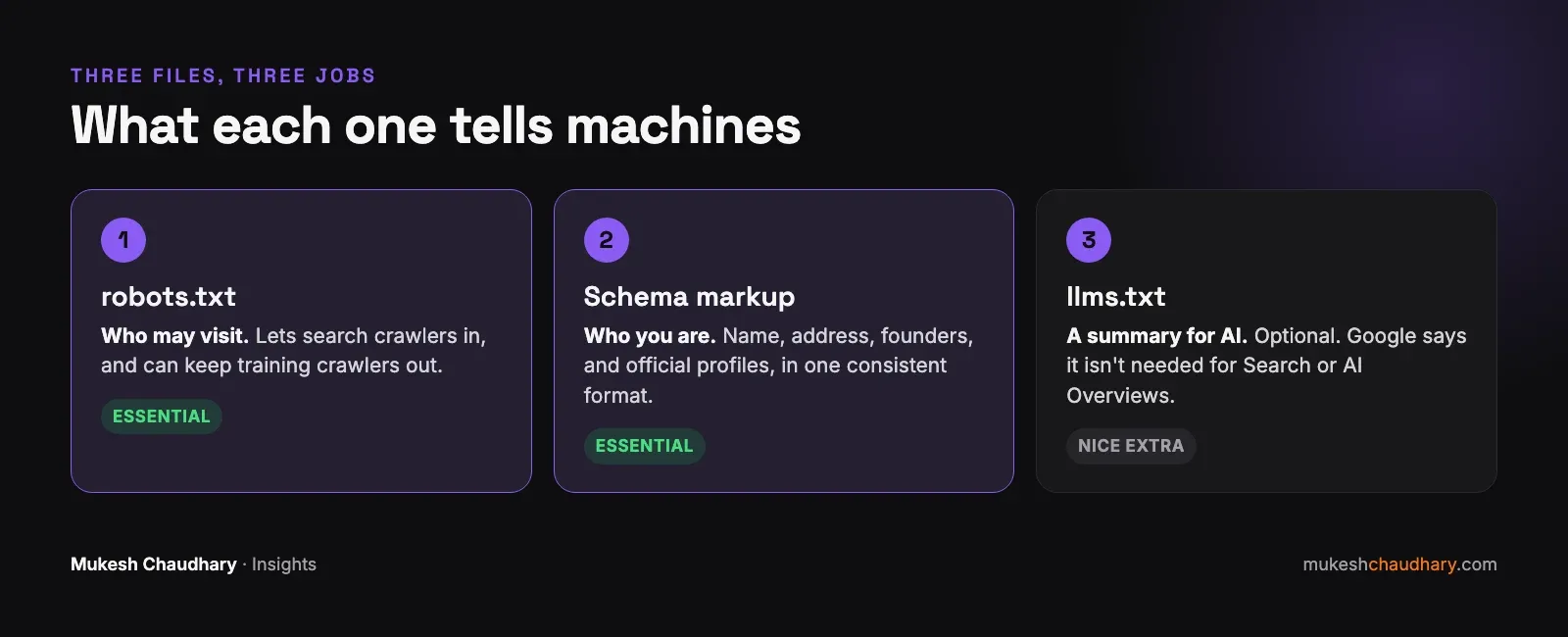
Three things decide how AI tools see your website: robots.txt (who may visit), schema markup (who you are, in a format machines can read), and, optionally, llms.txt (a short summary written for AI). The first two matter today. The third is a cheap extra.
When I rebuilt my own website this month, I set up all three. Here’s what each one does, in plain English, and what I’d tell any business owner to prioritise.
Which AI crawlers visit your website?
A crawler is a program that visits websites and reads them. Some crawlers collect pages for search results; others collect text to train AI models. That difference matters, because you can treat them differently.
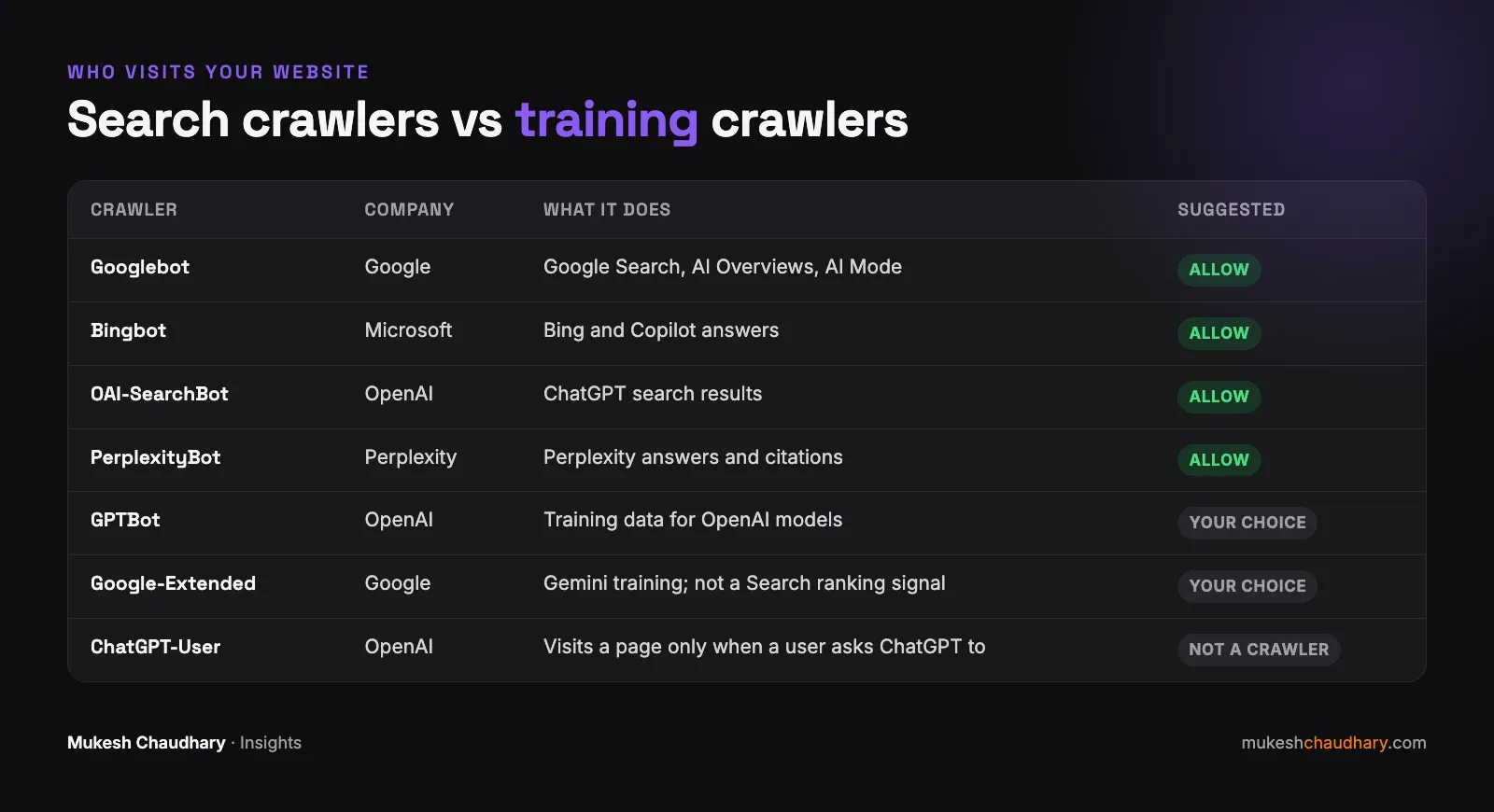
The ones that decide whether you can appear in answers:
- Googlebot feeds Google Search, which also powers AI Overviews and AI Mode.
- Bingbot feeds Bing, which also powers Microsoft Copilot.
- OAI-SearchBot is OpenAI’s search crawler for ChatGPT. OpenAI says plainly: “OAI-SearchBot is for search.”
- PerplexityBot indexes pages for Perplexity’s answers.
The ones that are a separate choice:
- GPTBot collects content that may be used to train OpenAI’s models. Blocking it doesn’t remove you from ChatGPT search; OpenAI says each setting “is independent of the others”.
- Google-Extended is a control for Gemini training and some grounding. Google says it “does not impact a site’s inclusion in Google Search nor is it used as a ranking signal”.
And one that behaves differently:
- ChatGPT-User visits a page only when someone asks ChatGPT to look at it. It isn’t crawling the web on its own.
What should your robots.txt file say?
Robots.txt is a small text file at yourwebsite.com/robots.txt. For most businesses that want to be found, the simplest version is the right one: allow everything, and point to your sitemap.
User-agent: *
Allow: /

Sitemap: https://yourwebsite.com/sitemap.xml
If you’d rather keep your content out of AI training, add separate blocks for GPTBot and Google-Extended. Never block Googlebot, Bingbot, or OAI-SearchBot unless you truly want to disappear from those results.
Check your host and firewall as well. Hosting companies and CDNs increasingly filter bots. On my own site, a test request pretending to be GPTBot was refused, while my host’s AI audit showed the real crawlers getting through. Robots.txt can say “welcome” while the firewall says “no”, so look at both.
What is schema markup, and why does it matter more now?
Schema markup is a block of structured data in your page’s code. Visitors never see it; search engines and AI tools read it like a form you’ve filled in about yourself: name, logo, address, phone, founders, and links to your official profiles.
Google says Organization markup helps it “disambiguate your organization in search results”. For a small business, disambiguation is the whole point. Many businesses share names with others, and so do many founders. I share mine with a cricketer and a politician, which is exactly why my site’s markup says which Mukesh Chaudhary I am, and links to the company websites that confirm it.
What I’d add, in order:
- Organization or LocalBusiness markup on your home page, with
name,logo,address,telephone,url, andsameAs(links to your LinkedIn, Instagram, Google Business Profile, and so on). - Person markup for the founder, if the founder is part of the brand, linked to the business.
- FAQ and Article markup on pages that answer questions, so their structure is unambiguous.
The most important rule: the markup must match the visible page and every other profile. Markup that contradicts your Google Business Profile does more harm than no markup at all.
What is llms.txt?
llms.txt is a proposed standard from 2024: a plain text file at yourwebsite.com/llms.txt that summarises who you are and lists your most important pages, written so AI tools can read it quickly.
Here’s the honest status. Google says you don’t need “new machine readable files, AI text files, or markup” to appear in AI Overviews or AI Mode, and Google’s John Mueller has compared llms.txt to the old meta keywords tag. No major AI company has said it relies on the file.
I have one on my site anyway, because it took ten minutes and repeats facts that appear everywhere else. I don’t expect it to move anything on its own, and you shouldn’t either.
A 30-minute checklist for your website
- Open yourwebsite.com/robots.txt. Make sure Googlebot, Bingbot, OAI-SearchBot, and PerplexityBot aren’t blocked.
- Check your host or CDN dashboard for bot protection settings.
- Test your home page in Google’s Rich Results Test to see what markup it already has.
- Add or fix Organization/LocalBusiness markup, with
sameAslinks to your official profiles. - Compare the name, address, and phone in your markup with your Google Business Profile. Make them identical.
- Optional: add an llms.txt with your one-line description and your five most important pages.
If you haven’t yet, read how to get your business mentioned in ChatGPT and AI Overviews. Files and markup are only the foundation; consistent facts and other websites confirming who you are do the heavy lifting.
Want me to check what your website tells AI tools today? Book a free consultation.