AI tools mention businesses they can find, understand, and trust. That’s the whole game. ChatGPT, Gemini, Perplexity, and Google’s AI Overviews don’t invent their answers about local businesses; they build them from web pages. If those pages are missing, unclear, or contradict each other, the AI either skips you or gets you wrong.
I learned this the personal way. In October 2026, when I searched my own name, the results were about a cricketer and a politician who share it. Nothing online clearly connected “Mukesh Chaudhary” to Bizyocon, the agency I co-founded. So I rebuilt my website and fixed the signals around it, step by step. This article is that checklist, written for business owners rather than SEO people.
How do AI tools decide which businesses to mention?
Each AI tool answers from a different pool of web pages, but they all need the same thing from you: pages they can reach, read, and believe.
- Google AI Overviews and AI Mode use Google’s own index. Google says a page only needs to be “indexed and eligible to be shown in Google Search with a snippet”, and that there are “no additional requirements” or special optimisations.
- ChatGPT search uses OpenAI’s crawler, OAI-SearchBot, plus third-party search providers. OpenAI doesn’t name them all, but Bing is widely believed to be one of them.
- Gemini grounds many answers in Google Search results.
- Perplexity runs its own crawler and cites its sources openly.
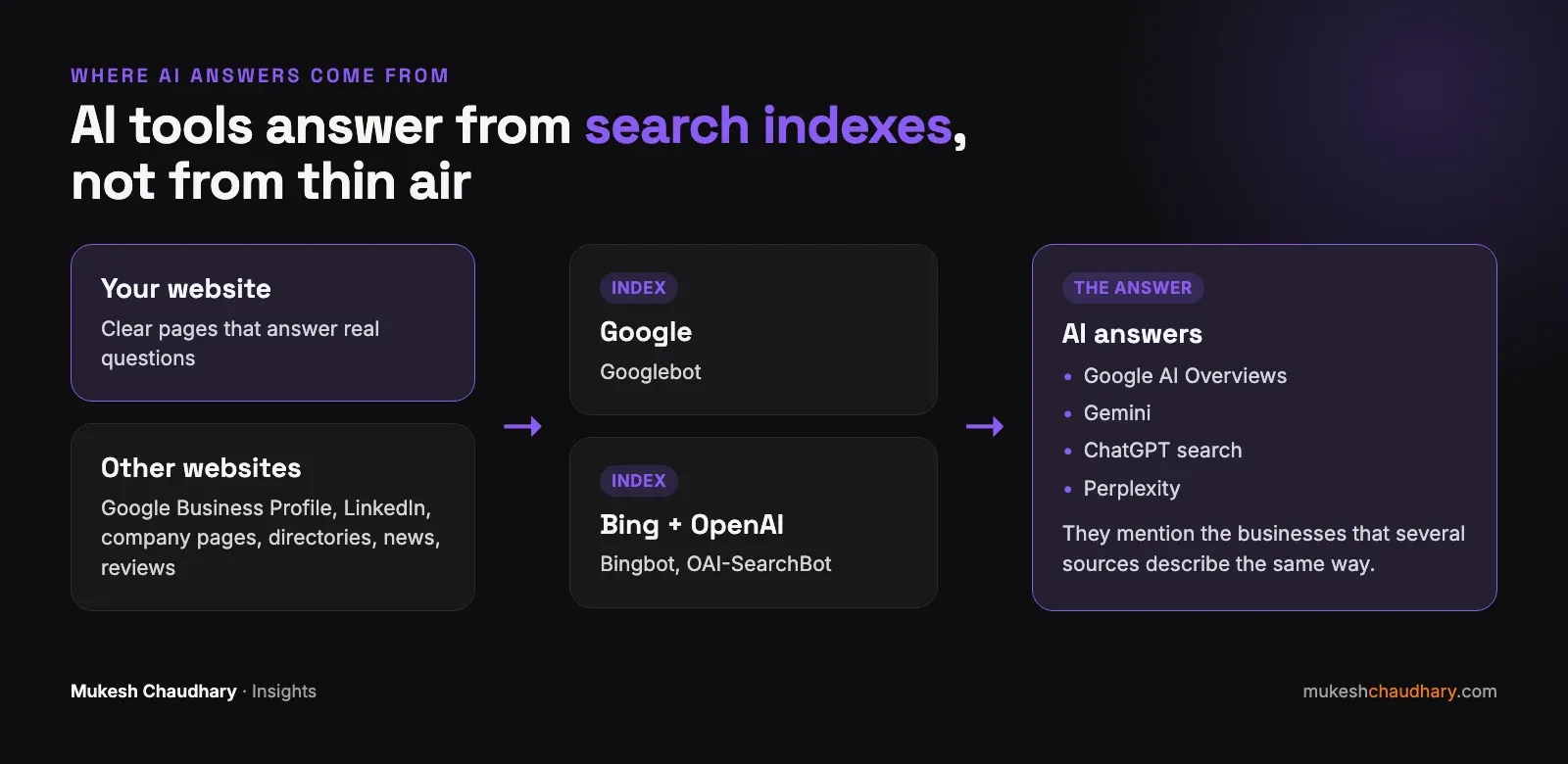
Notice what’s in the middle of that picture: search indexes. AI visibility is not a separate channel from SEO. It sits on top of it. If you want the background on how Google judges pages, start with the three questions Google asks before it ranks a page.
Step 1: Make sure AI crawlers can reach your website
Before anything else, check that you aren’t blocking the bots that matter. Two places to look:
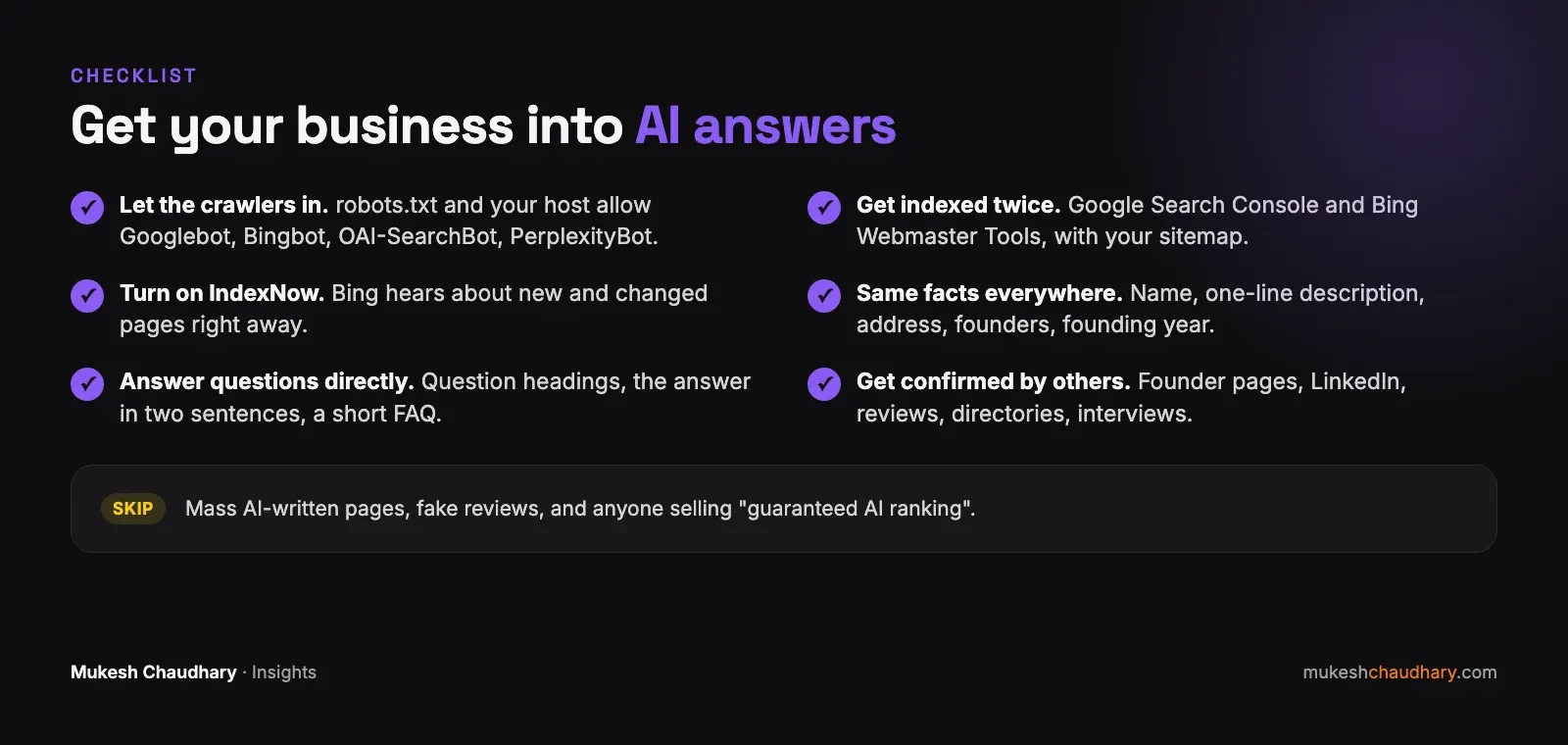
- Your robots.txt file (yourwebsite.com/robots.txt). It should not block Googlebot, Bingbot, OAI-SearchBot, or PerplexityBot.
- Your hosting or firewall settings. Many hosts now have bot protection. When I tested my own site, a fake “GPTBot” request from my laptop was blocked, which worried me. My host’s AI audit showed the real crawlers were getting through, so it was most likely blocking imposters only. Check yours rather than assume.
One detail that confuses people: GPTBot is the crawler OpenAI uses to collect training data. Blocking it does not remove you from ChatGPT search. OpenAI says its crawler settings are independent of each other, and search visibility depends on OAI-SearchBot.
Also make sure your important content is in the page’s HTML, not loaded later by JavaScript. Google can usually handle JavaScript; many AI crawlers read only the raw HTML.
Step 2: Get indexed in both Google and Bing
Most Indian businesses set up Google Search Console and stop there. For AI visibility, do both:
- Google Search Console: verify your site and submit your sitemap.
- Bing Webmaster Tools: sign in and choose “Import from Google Search Console”. It copies your verified sites and sitemaps in about two minutes.
- IndexNow: if your website platform supports it, turn it on. It tells Bing and several other search engines the moment a page changes. My site now does this automatically after every update.
When I launched my new site on 17 October, Google had crawled the home page by the next day, and Bing read the sitemap the same day I submitted it. Fast indexing doesn’t guarantee mentions, but nothing happens without it.
Step 3: Tell the same story everywhere
AI tools cross-check. If your website says one thing, your Google Business Profile another, and LinkedIn a third, they lose confidence and often say nothing.
Write down five facts and use them word for word everywhere:
- Name: the exact business name, including the legal name if you use it.
- What you do: one sentence, the same one each time.
- Where you are: the exact address from your Google Business Profile.
- Who runs it: founder names and titles.
- Since when: the founding year.
When we did this for Bizyocon, we found three slightly different versions of our own office address across the website. Small differences like that look careless to a person; to a machine they look like three different places. We matched every one to the Google Business Profile.
Step 4: Write pages that answer real questions directly
AI tools quote passages, not whole pages. A page that opens with two paragraphs of “In today’s digital world…” gives them nothing to quote.
What works:
- Use the customer’s question as the heading. “How much does a website cost in Gandhinagar?” beats “Our Pricing Philosophy”.
- Answer in the first two sentences, then explain.
- Be specific. Prices in rupees, timelines in weeks, locations by name, numbers you can stand behind.
- Add a short FAQ at the end of important pages.
- Show who wrote it, with a real author and their experience.
This article follows the same pattern, which is not an accident.
Step 5: Get other websites to confirm who you are
This is the step most businesses skip, and it matters most. AI tools trust what several independent sources agree on far more than what you say about yourself.
Sources that help:
- Your company’s own website, with a founder or team page that links to the founder’s profiles.
- LinkedIn, with a headline and job titles that match your website exactly.
- Google Business Profile with real, recent reviews.
- Industry directories, local news, interviews, and podcasts that mention you by name.
- Partner and client websites that link to you.
For me, this meant founder pages on both company websites, Bizyocon and Welooxa, each linking to my personal site, and my personal site linking back. Three sites now tell search engines the same story about the same person.
How do you check whether it’s working?
Don’t rely on one search. Once a month:
- Ask ChatGPT, Gemini, and Perplexity the same three questions, such as “Who are the best digital marketing agencies in Gandhinagar?”, “Who founded [your company]?”, and “[your service] near [your city]”.
- Note whether you’re mentioned and which websites are cited.
- Check Google Search Console for impressions, and the AI Performance report (in beta) in Bing Webmaster Tools.
Expect weeks to months, not days. Search engines need to crawl your changes, and AI tools need several sources to agree before they repeat something.
What should you avoid?
- Publishing hundreds of thin AI-written pages. Google treats mass-produced pages made to manipulate rankings as spam, however they were written. It can pull down your whole site.
- Fake reviews. They break Google’s policies, and AI tools increasingly read review text for patterns.
- Contradicting yourself. An old address or founding year on a forgotten page undoes good work elsewhere.
- Paying for “guaranteed AI ranking”. Nobody can guarantee what an AI says.
The short version
There is no secret file and no paid shortcut. AI tools mention businesses that are easy to find, easy to understand, and confirmed by others. That is good SEO and good reputation, done consistently.
If you’d like a second pair of eyes on how AI tools currently see your business, book a free consultation. I’ll run your business through the same checks I used on my own.